
Delete your account
Delete Account & Data
At FacePass, we respect your privacy and give you full control over your personal data. You can delete your account and all associated data directly from the app.
How to Delete Your Account
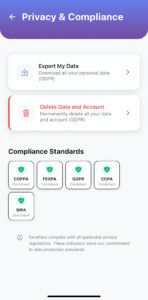
Open the FacePass App.
Go to Settings → Privacy & Compliance.
Tap Delete Account.
Confirm your decision by entering your account password.
All your personal data, including student profiles, check-in/out history, and notifications, will be permanently deleted.
Important Notes
This action is irreversible. Once deleted, your data cannot be recovered.
Deleting your account will remove access to the app and all associated features.
Any data stored by schools for administrative purposes may still exist in compliance with legal obligations.
For questions or assistance, contact us at:
Email: support@getfacepass.app